What “verified” actually means
Copied is not the same as safe. A copy can be silently truncated by a full disk, corrupted by a flaky reader, or damaged by a cable that let go at the wrong moment — and still look perfectly normal in Finder.
ShotPorter reads every ordinary copy back from disk and compares its full checksum with the original. Only a byte-for-byte match counts as done.
If metadata was embedded during copying, a byte-for-byte match is no longer possible. ShotPorter then verifies separately that the image or video payload is unchanged and that the new metadata was written and can be read back.
A copy that fails the required check is not “mostly fine.” It does not count as safe for the archive at all. A matching name and size are not enough. Names lie; checksums do not.
Files that fail verification will not be deleted during card processing.
When something goes wrong
Card readers fail. Disks fill up. Cables get pulled halfway through a job. When that happens, files whose processing did not finish stay exactly where they were — on the card. They are clearly marked as errors and excluded from standard deletion and every Hands-Free action.
In other words, when something fails, ShotPorter always errs on the side of keeping your files. A failure may leave you with a card you have to run again tomorrow, but not a photograph you can never recover. Unless the failure physically damaged the card itself, of course… but that is a different story.
A matching name does not mean “duplicate”
If the name, size, and creation date all match, the files are probably duplicates. Probably is not proof. The odds that two files matching all three are actually different may be tiny — but lottery odds are tiny too, and someone still wins.
So no: matching names, dates, and sizes still require independent confirmation by checksum and metadata comparison.
When today’s DSC_0001 meets a month-old DSC_0001 in the archive, ShotPorter does not jump to conclusions. If they are different, the new file keeps its original name in a neighboring version folder. If they are identical, the duplicate is marked safe to delete. Nothing in the archive is overwritten.
Running an already processed card again does not clutter the archive with extra copies. And if two copies of one image differ only in metadata, ShotPorter keeps the richer version or asks which one to retain. Work already done never disappears silently.
Metadata debts must be honored
If you asked ShotPorter to write keywords or authorship data, a verified copy alone is not enough. The file still carries a debt: the promised metadata has not reached the archive yet.
Until the keywords and authorship data are written to the copy and read back for verification, the file is not archive-safe. It is excluded from standard deletion and will never be deleted by Hands-Free mode.
In manual mode, a pending write can be cancelled, but only in a separate confirmation dialog. Keyword and authorship work never vanishes unnoticed: the data will either be written, or you will consciously choose to abandon it.
Before deletion, you see the whole picture
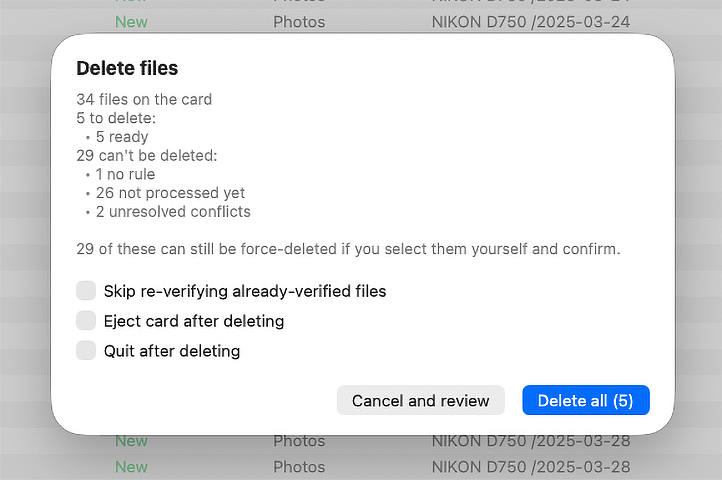
ShotPorter shows every file and explains why it can be deleted or why it must stay. Errors, unresolved conflicts, and unfinished metadata writes do not hide behind a single total.
You confirm a concrete list of files, not an abstract “clear card” command. Every number adds up, and you know exactly what will happen before you press the button. Most importantly, originals without a verified copy at their intended destination cannot be deleted.
Clean up, eject, back to the camera
ShotPorter does not format the card. Formatting is too blunt for safe offload: it cannot distinguish verified files from unprocessed ones, and it can destroy valuable material left on the card. Camera manufacturers also recommend formatting media in the camera, not in a third-party application.
After deleting the files you allowed, ShotPorter can remove empty folders and trash, then eject the card safely — ready to go back into the camera.
Each step is enabled separately; card system folders remain untouched by default. If you permit nothing, ShotPorter leaves the card exactly as it found it. Even if you permit every step, unprocessed files still cannot be deleted.
So how do I clear the card if ShotPorter will not let me?
Photographers and videographers are grown-ups. If a card contains files you want gone without archiving, that is your call. Does ShotPorter second-guess you and take that choice away?
Of course not. But we will admit it: we are safety paranoids. ShotPorter protects you from reflex — the human factor that makes fatigue, stress, or simple distraction turn one routine click into something irreversible.
So yes, you can clear any files from a card. It is simply not easy enough to happen by accident.
In manual mode, “Delete All” behaves differently depending on the card’s state. While archive-safe and unprocessed files are mixed together, only the safe files are deleted. The dialog says this explicitly; unprocessed files do not participate in standard deletion.
Only when unprocessed files are all that remain does ShotPorter allow those to be deleted too. They can no longer disappear in a long mixed list or be swept away with the rest: they go because you made a firm decision. First, the normal deletion dialog warns you. Then a second window appears with a deliberately alarming design, explains the consequences again, and requires separate explicit consent.
For unwanted files that appear regularly, there is a separate mechanism: classify their type as trash and allow it to be deleted without copying. “Delete trash files” is off by default.
One copy is not a backup
One honest note to finish: no application can replace backups, and neither can ShotPorter. After offload, a disk can fail, a Mac can disappear, and coffee can spill in exactly the wrong place.
Record to two cards if your camera allows it, and keep your archive on more than one disk. One verified copy is still only one copy.
ShotPorter makes the beginning of a file’s life in the archive safe. It does not relieve you of normal backup discipline.